Unfolding: Operation
I want to use a simple experiment to explain something concrete about AI creativity. Critical thinking goes through understanding the technical aspects.
I gave an AI a photo of a real geometry book page. Asked it to redraw my own nine tangent circles in that style. It came back convincing, mathematicalicious. But the circles didn't touch. Something slipped. Here's why: the AI learned from millions of images, so many connections. I imagine that learned space as folding of pattern into pattern. It samples from that blur. Close enough to convince, not exact enough to be right. That's the risk in any creative process, not just AI. Creativity, for me, is unfolding an idea. It's a metaphor I found in 3D simulation: more rows, more columns, higher resolution, until it becomes uncannily smooth, unworkable. Fold real paper enough times and the same thing happens. Un/folding is adding connections, more folds. Push too far, and the distinct folds that made it interesting blur into one smooth average. No edges left. That's slop.
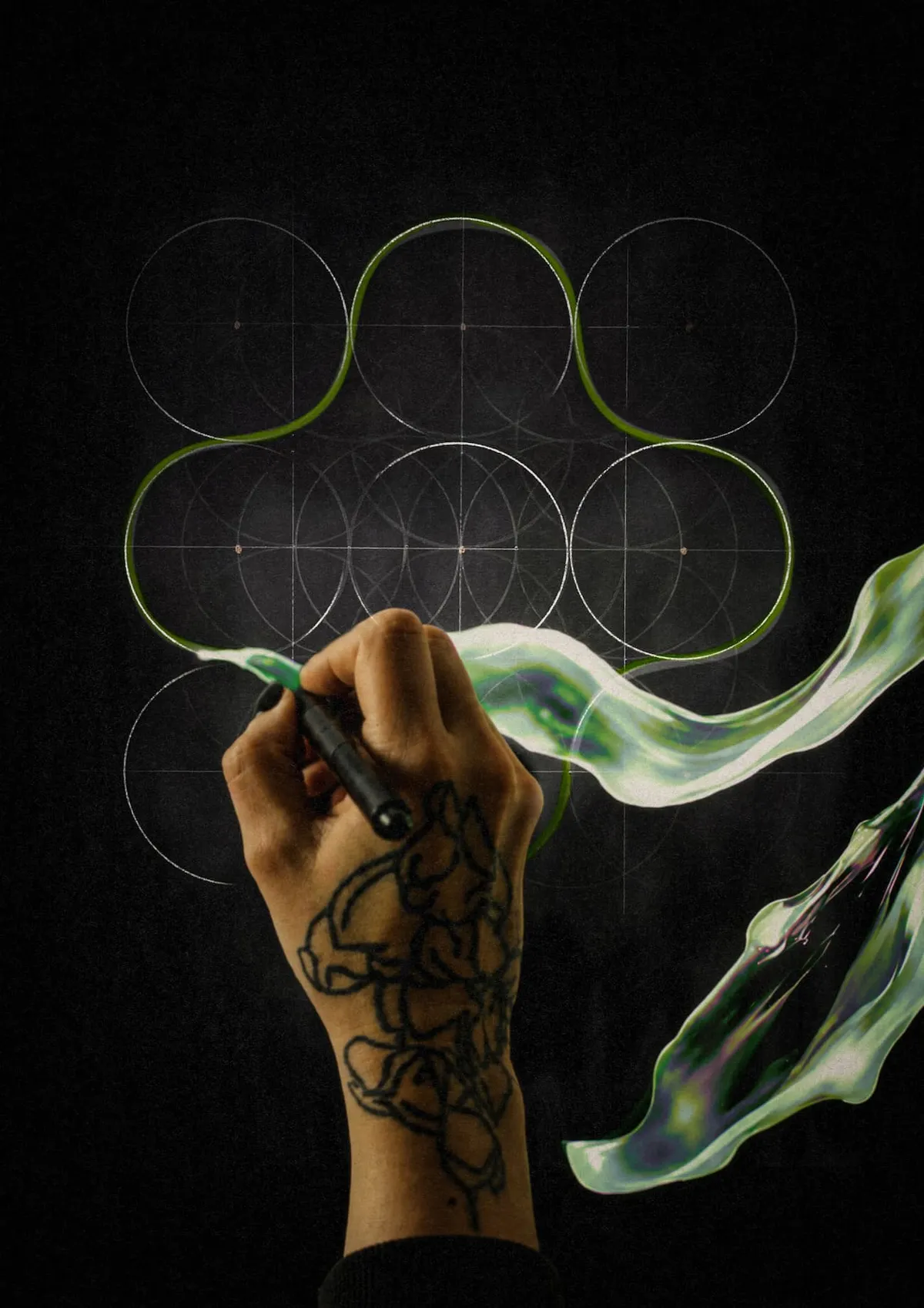
La Lumière ne se plie pas pour nous. Light Doesn't Bend (Fold) for Us
1. Changing medium is a form of verification
Critical thinking goes through understanding the technical aspects, but also through testing our own thinking. While making this chapter, I turned the text into a comic sketch (coming soon) to see whether I could explain it visually. Moving from writing to drawing exposed things I had not seen in the text. By trying to explain the idea in another medium, I was forced to test my own assumptions. I went back to the geometry, reviewed the code, corrected it, and realized that the rounded cross was much simpler than I had thought: a 180° outward arc followed by a 90° inward arc, repeated four times.
That became part of the experiment itself. Moving an idea from writing to drawing helped me see it differently, just as moving a form from Turtle to SVG, from 2D to 3D, or from digital to physical reveals different things about it. Changing medium is not only a way to produce something new. It can also be a way to verify, question and correct what we think we know.
This may be one of the most useful lessons for anyone trying to be creative with AI: don’t only ask AI for answers. Moving an idea from one medium to another is a way of testing it. Dance with the idea. Draw it. Code it. Explain it. Build it. Compare the results. Look at what survives, what changes, what disappears, and what you got wrong.
Creativity and critical thinking can be the same operation: unfolding an idea until you can see it on the back side of the paper.
2. What happens when an idea moves from one system into another?
It began with a basic geometric drawing, but the drawing became a way of comparing how different systems represent, process, and transform the same idea.
The broader process comes from my 2024 Huuuumans project, where I have been moving between Turtle Geometry, a 1981 method of drawing shapes with code, procedural 3D, vector drawing, AxiDraw, watercolor, animation, sound, and AI. I described a shape in Turtle Graphics, reconstructed it mathematically as an SVG, turned it into a three-dimensional object, extruded it, twisted it and sliced it. I sent vectors to a drawing machine and brought them back onto paper. I intervened with watercolor. And I gave the same material to a generative AI and asked it to make an image. These systems do not do the same thing.
Huuuumans, 2024.
3. What is human & AI creativity?
Let's say it's about making connections that weren't supposed to be connected. But what kind of connection? And what verb captures that process? The drawings I see in my head spark deep curiosity, maps to invisible worlds. Flat representations are just one way to play. I love working with 3D and computer graphics. What fascinates me most is the shift between dimensions. How do I fold paper to discover new routes, reveal multiple perspectives? How do I create volume from points and curves?
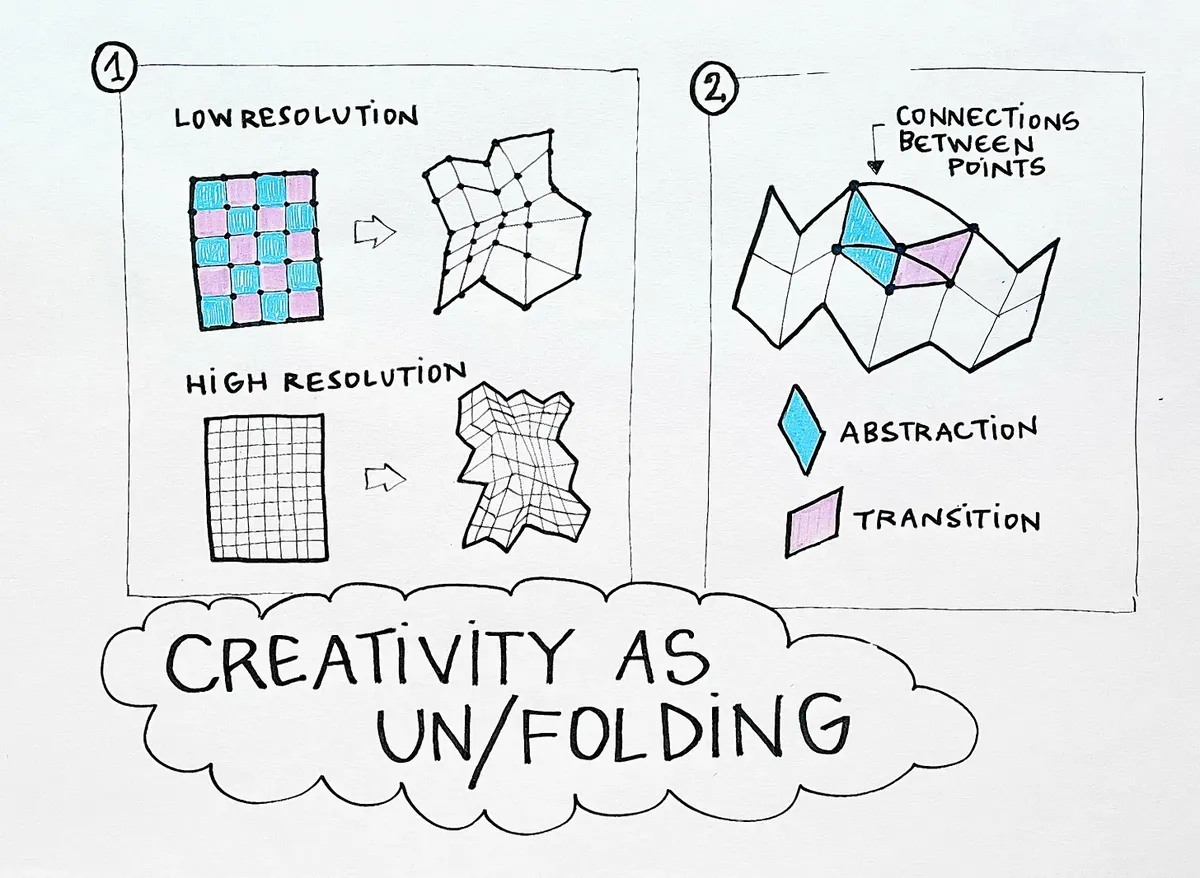
In 3D, using Houdini, I can fold a grid in different ways: manipulating resolution, creating more or fewer folds, adjusting the stiffness or elasticity between points. In Huuuumans' world, abstraction is one surface to bend, transition another. If I want the process less rigid, I increase the resolution and explore the invisible connections between the points of each concept. But too much resolution, and the edges disappear. A mesh with too many points stops bending.
4. One real page, one AI-generated image, one AI-written SVG
The easiest way to begin is with three images:
- one real page,
- one fake AI image (pixel-based image generated by AI),
- one fake exact AI image (SVG image coded by AI).
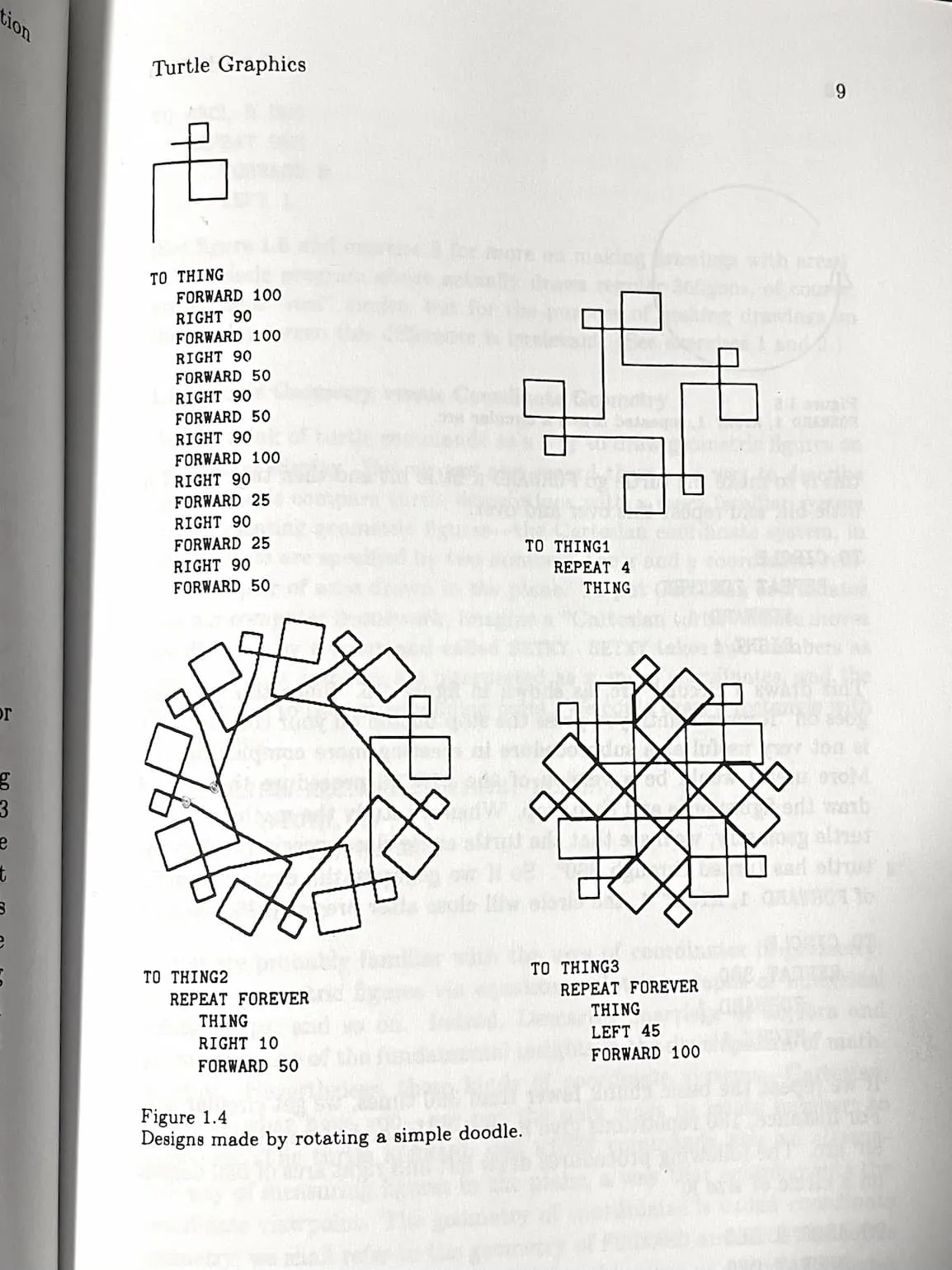
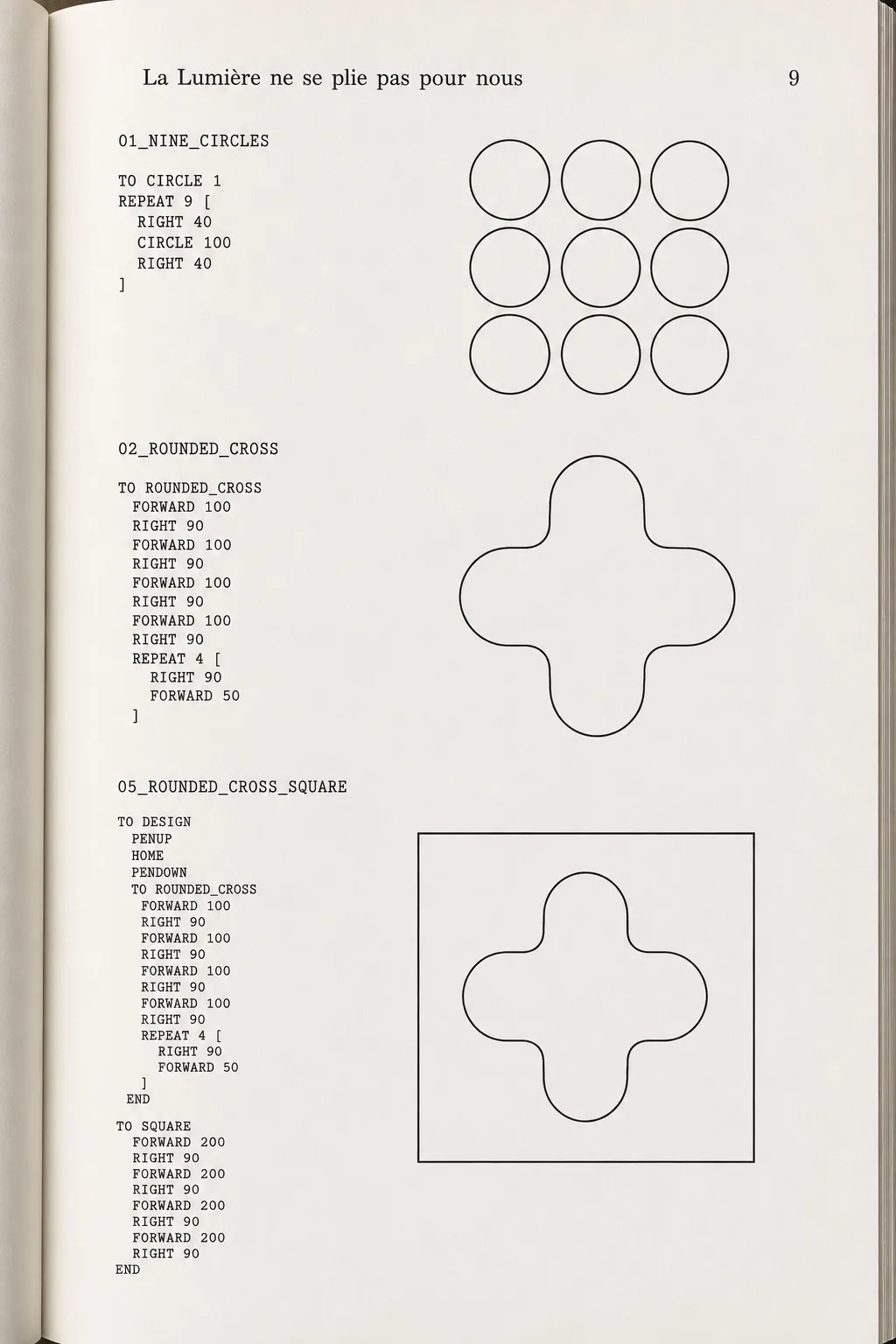
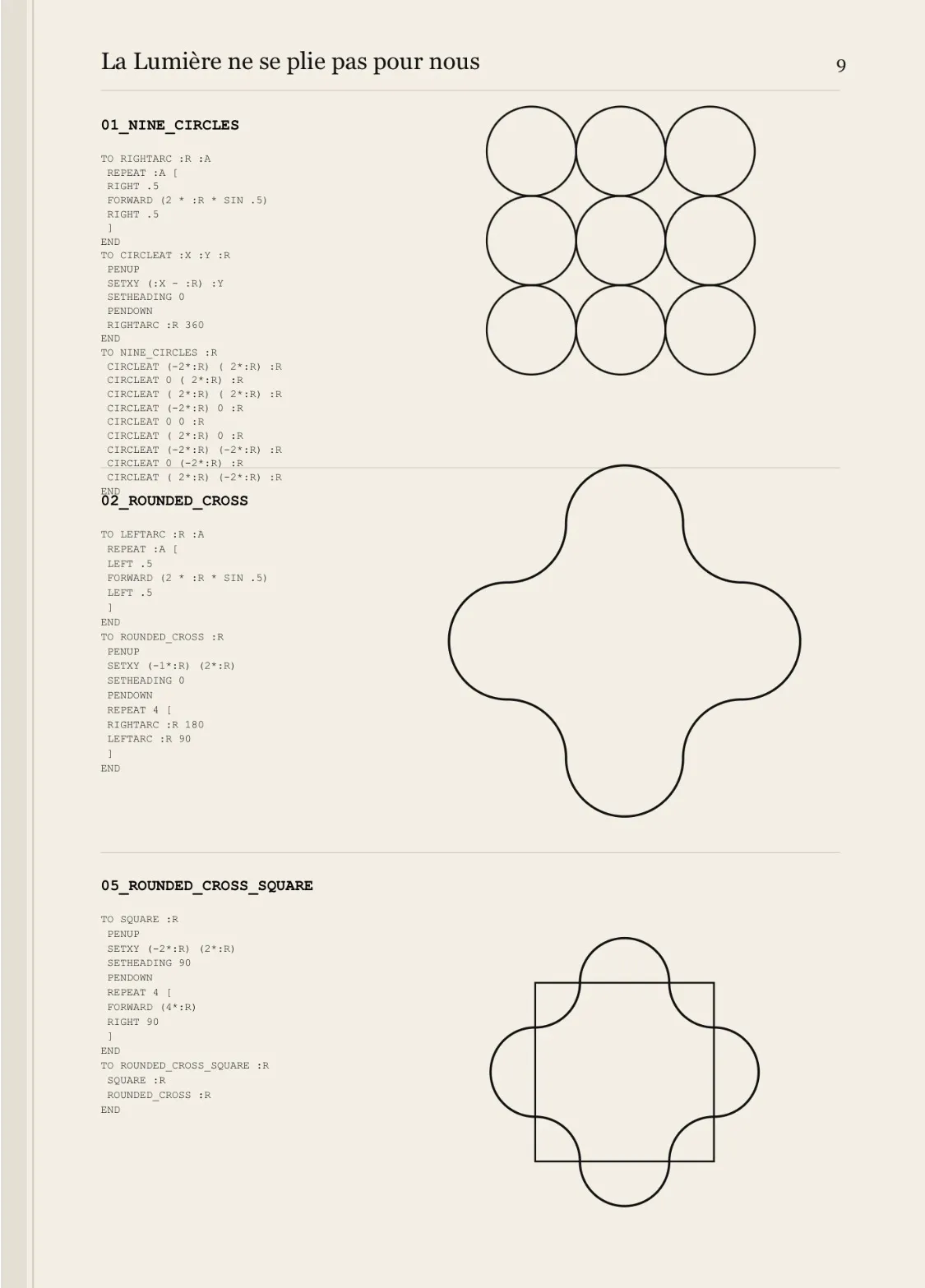
The first is a photograph of a real page from Turtle Geometry. It contains code, diagrams and a very particular graphic language: black lines, simple typography, technical drawings, an off-white page and a precise relationship between instruction and result. This is my visual reference. I then gave this photo to a generative image model (ChatGPT) and asked it to create a new page in this visual language, with the title La Lumière ne se plie pas pour nous and with three of my own constructions:
- NINE_CIRCLES
- ROUNDED_CROSS
- ROUNDED_CROSS_SQUARE
I also gave the geometry and the corresponding code. It looked like a real book page. The typography, the paper, the hierarchy, the diagrams looked mathematicalicious, and the code too. But the geometry and the code were wrong.
Something slipped.
Then I asked AI to produce the construction as SVG code. The AI was still involved by writing the code but once that code existed, the SVG renderer executed the explicit geometric instructions deterministically. I could check the numbers, test the relationships and correct the code. The comparison is not simply AI versus non-AI.
5. What was the AI actually doing?
The AI image generator was not executing my drawing instructions in the same way that a Turtle interpreter or SVG renderer would. It was interpreting them. It recognized a visual situation: old technical book + mathematical diagram + Turtle Graphics + circles + code + geometric construction. From those relationships it generated a plausible image. This gives me a simple distinction about different operations:
- Generative AI → visual interpretation while:
- Turtle → explicit procedure; SVG → explicit vector geometry.
By interpretation here, I do not mean that the AI understands the drawing as a person does. I mean that my prompt and reference constrain the result without uniquely specifying every visual decision.
And we need to be more precise:
- AI image generation → the output itself is generated probabilistically.
- AI-written SVG → the code may be generated probabilistically, but the resulting geometry is executed deterministically.
6. What does “deterministic” mean here?
To understand the difference, I reconstructed the geometry using SVG. SVG stands for Scalable Vector Graphics. It's a way to describe an image using math: points, lines, curves, circles, instead of a grid of colored dots (pixels).
If I write:
<circle cx="200" cy="200" r="100"/>
I am not asking the computer: Can you make something that looks like a circle somewhere here? I'm giving it exact numbers:
centre x = 200
centre y = 200
radius   = 100
The circle is defined mathematically. If I render the same SVG again under the same conditions, the geometry remains the same. A deterministic system follows explicitly defined rules and parameters. Given the same instructions, those geometric relationships are reproduced. The machine is not interpreting what I might mean by a radius of 100. It uses a radius of 100. If two circles have radius R and their centres are separated by 2R, they are tangent. The computer does not need to decide whether they look close enough. The relationship is encoded in the construction.
deterministic → the rule determines the construction
Generative AI operates differently. Its output is produced through a learned probabilistic model. Here's what that means concretely: the model was trained on large datasets of images and image-text relationships, learning statistical patterns in which shapes, textures and arrangements tend to appear together. It doesn't store an exact rule like "radius = 100." It stores something closer to a landscape of possibilities, some more likely than others. When I ask it to generate an image, it isn't calculating one guaranteed answer. It's sampling from that learned landscape, following a path likely to match what I asked for. The same or similar prompt can lead to different visual realizations. It can preserve the semantic and visual idea of the instruction without preserving its exact mathematical structure.
If I need nine circles to be mathematically tangent, interpretation is a problem. I want the deterministic system. If I want to see how those nine circles might mutate, acquire another atmosphere, enter another visual language or suggest something I had not anticipated, interpretation can become useful. One system gives me precision and repeatability. The other gives me interpretation and variation. Then my creative question is: At which moment do I need the machine to strictly follow the rule, and at which moment do I want it to interpret it?
5. Vector & Pixel
The experiment also makes another technical distinction visible: vector-based images and pixel-based images. An SVG, a vector format, describes an image through geometric information. A circle can be an abstract mathematical object:
<circle cx="200" cy="200" r="100"/>
It only becomes pixels when the computer needs to display it on a screen or print it. A photograph, by contrast, is a pixel image from the start: a grid of coloured values. A circle in that image can simply be a group of pixels that visually resembles a circle. It doesn't have to exist as an explicit mathematical object with a centre and radius. For this experiment, I want accuracy: the circles need to be tangent. So I choose the vector representation of my circles, to be sure it will do exactly what I write.
7. It tastes mathematicalicious
The AI-generated page demonstrates that a machine can produce the appearance of precision without necessarily preserving the structure that produces that precision. The fake page looked mathematical. The code looked computational. The diagrams looked geometric.
But “looking mathematical” and “being mathematically constructed” are not the same thing. This is useful for understanding AI-generated imagery more generally.
A generative image model is strong at relationships of appearance: What normally appears beside this? What kind of typography belongs here? What does a technical drawing usually look like? What visual structure makes this image recognizable? That capacity is exactly why the fake book page was so convincing. And exactly why it was wrong. If I need an exact construction, I need another system.
8. The nine circles
To understand what the AI failed to preserve, I have to return to the actual geometry. I began with a square and nine equal circles arranged in a 3 × 3 structure.
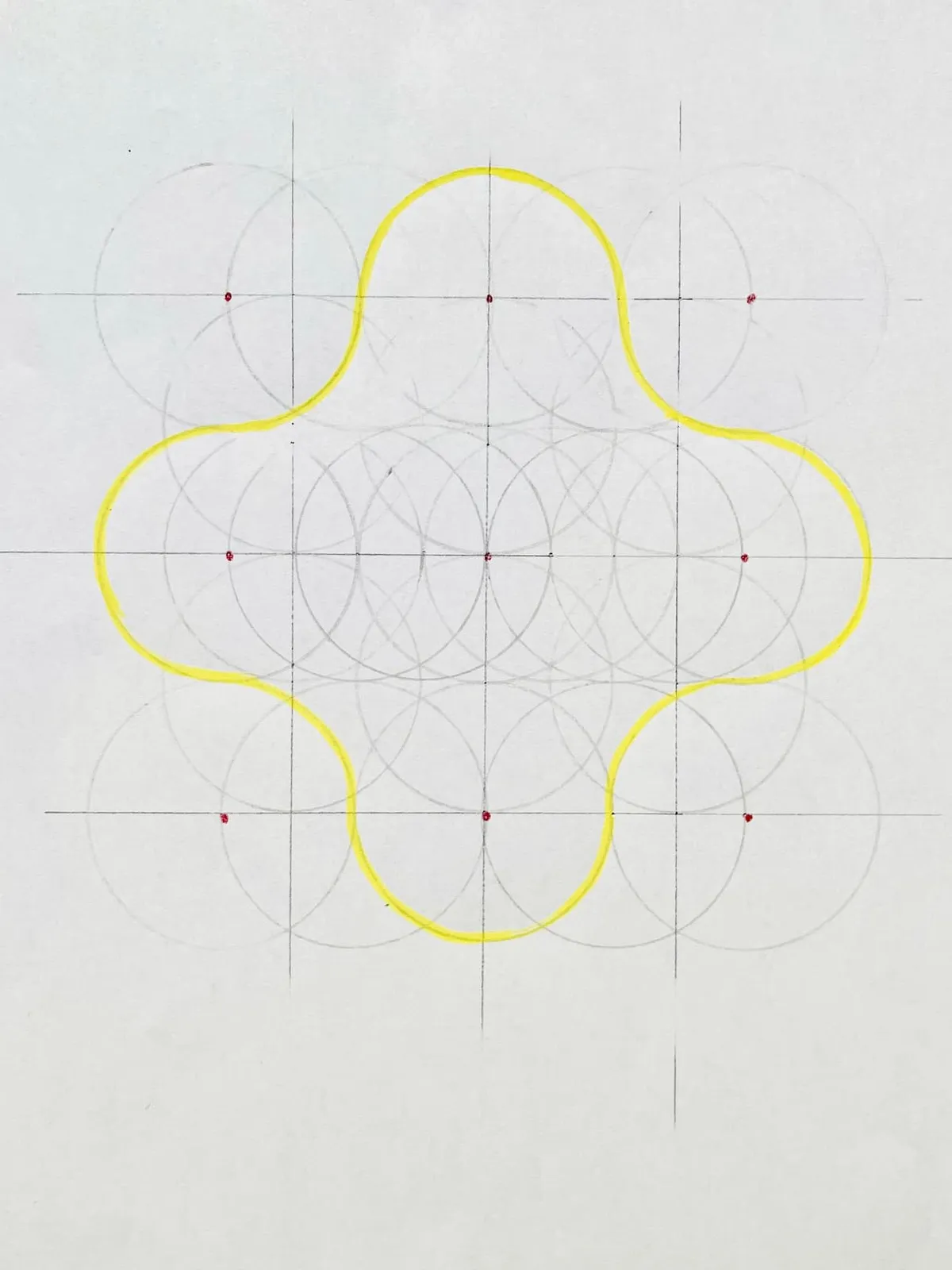
The rounded-cross boundary uses eight of these nine circles: the four edge-centred circles provide the outward semicircles, and the four corner circles provide the inward quarter-circles. The central circle belongs to the construction grid but does not contribute directly to the final contour.
For the construction I used: square side = 400 and therefore: R = square side / 4 = 100 The circle centres are separated by 2R = 200. They can therefore be positioned as:
(0,0)     (200,0)     (400,0)

(0,200)   (200,200)   (400,200)

(0,400)   (200,400)   (400,400)
All nine circles have:
R = 100
Adjacent circles therefore touch exactly.
9. Finding the shape
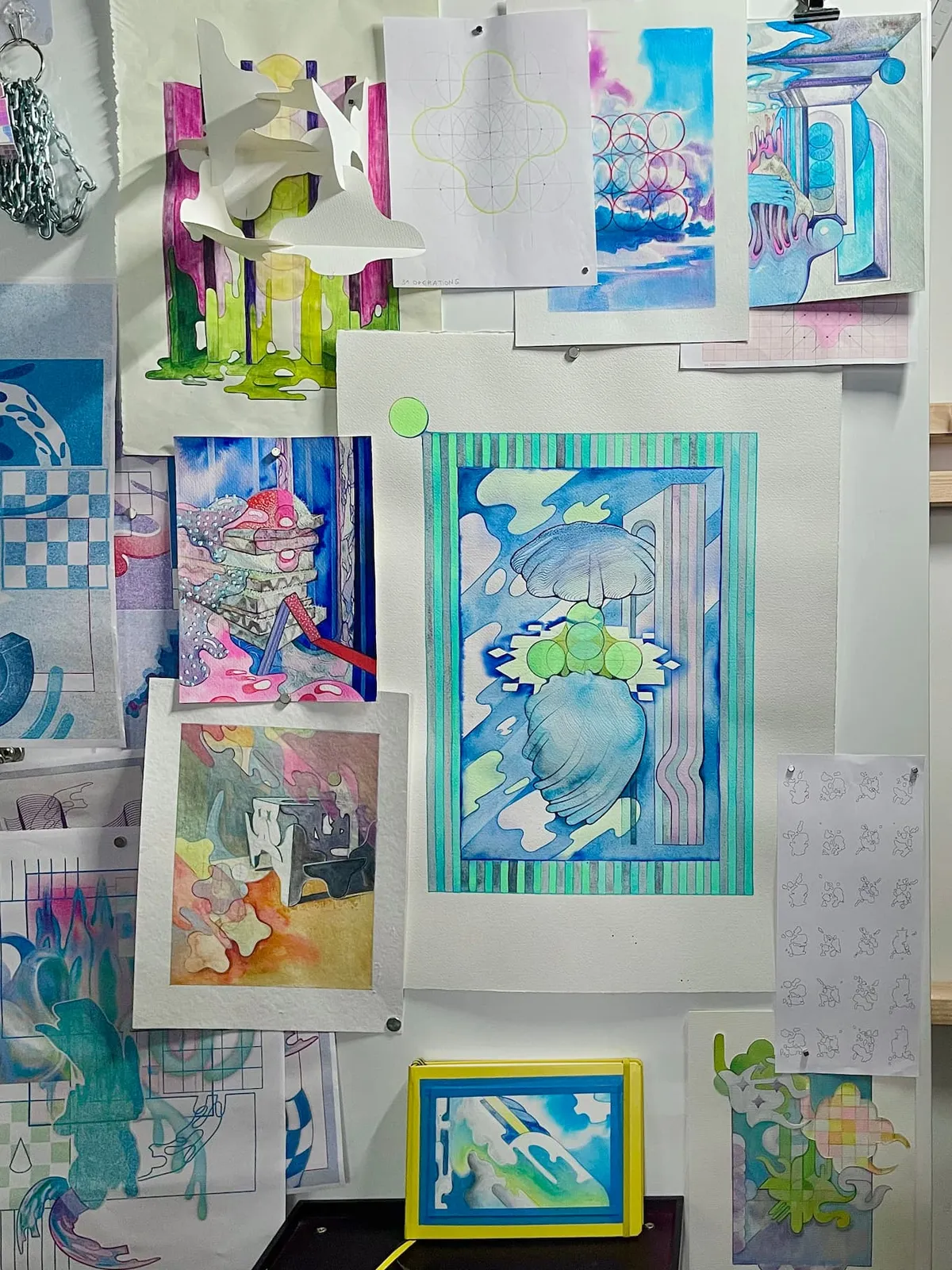 In the atelier, 2026.
From this nine-circle construction, I started following selected circular paths: folding actual paper, back and forth between 2D and 3D, by hand. This produced another shape: the rounded cross. The cross emerged from the geometry of the circles.
Its boundary is generated by one repeated relationship: a 180° outward arc from an edge-centred circle, followed by a 90° inward arc from a corner circle. Repeat this pair four times and the contour closes.
[180° outward arc + 90° inward arc] × 4
So the transformation is : nine circles → selected arcs → rounded cross. The same radius controls the construction. I got curious about what shape is already hidden inside this system.
10. Returning to Turtle Graphics
This connects back to Turtle Geometry. In Turtle Graphics, I do not describe the final image as an object. I describe a movement. The turtle moves forward. It turns. It follows an arc. It repeats. It dances. A drawing emerges from a procedure.
For the rounded cross, the essential operation can become super simple, so small as a procedure. Once the turtle is placed at the correct starting point and orientation, the entire contour is generated by only two arc instructions repeated four times.
REPEAT 4 [
    180° outward arc
    90° inward arc
]
The drawing exists simultaneously as several things: an image, a geometric construction, a sequence of movements, a piece of code.
11. Huuuumans process
This way of thinking comes directly from the process I developed in Huuuumans. There, I began with Turtle Geometry and creative coding, translated Logo-like procedures into Python, moved flat drawings into procedural 3D structures, flattened those structures again into vectors, sent them to an AxiDraw drawing machine, and intervened on the resulting physical drawings with watercolor. The work continuously moved between digital and physical states and between machine precision and human intervention.
- Turtle Geometry and Creative Coding: The journey begins with the 1981 “Turtle Geometry”, a method of drawing shapes with code. These initial explorations in creative coding lay the foundation for the entire project, sparking new forms and patterns that evolve throughout the process.
Experiment in Houdini, 2024
- Transition from Logo to Python: Moving from Logo (Turtle Geometry) to Python, the code generates simple doodles and geometric designs.
- 2D to 3D Procedural Modeling (Houdini): Expanding into three dimensions, procedural modeling in Houdini turns flat designs into 3D structures.
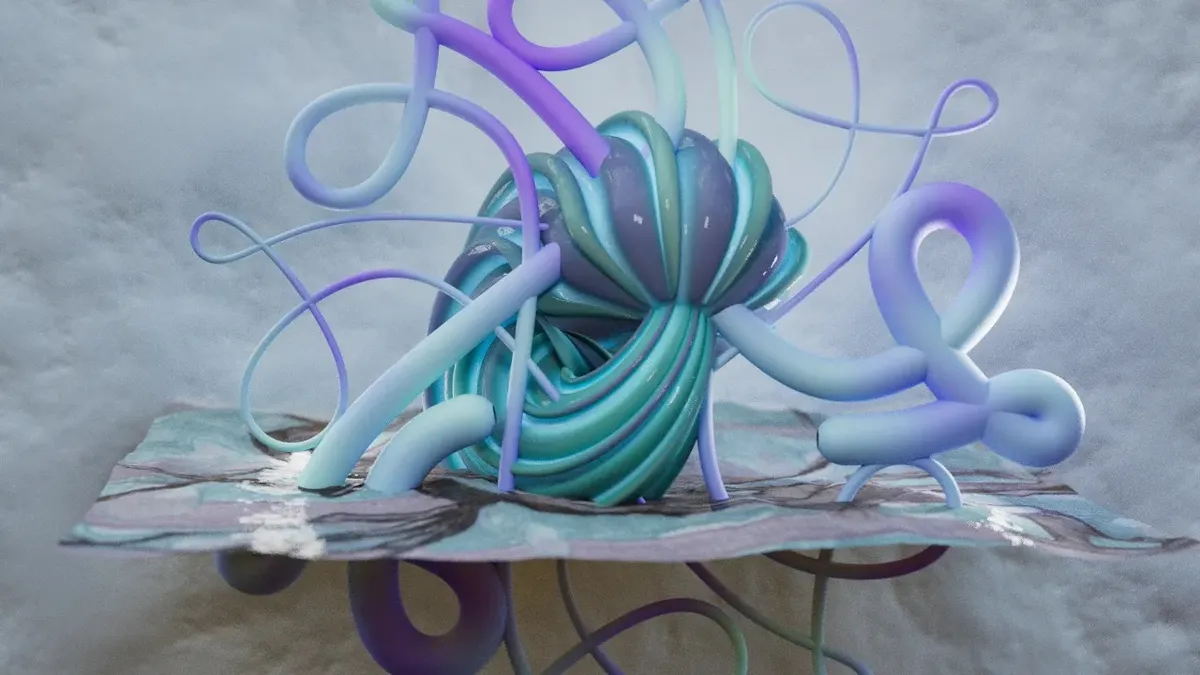
- 3D to 2D Vectorization: The 3D models are then flattened into 2D vector graphics, reinterpreting the spatial forms into linear designs that can be rendered by the AxiDraw drawing machine.
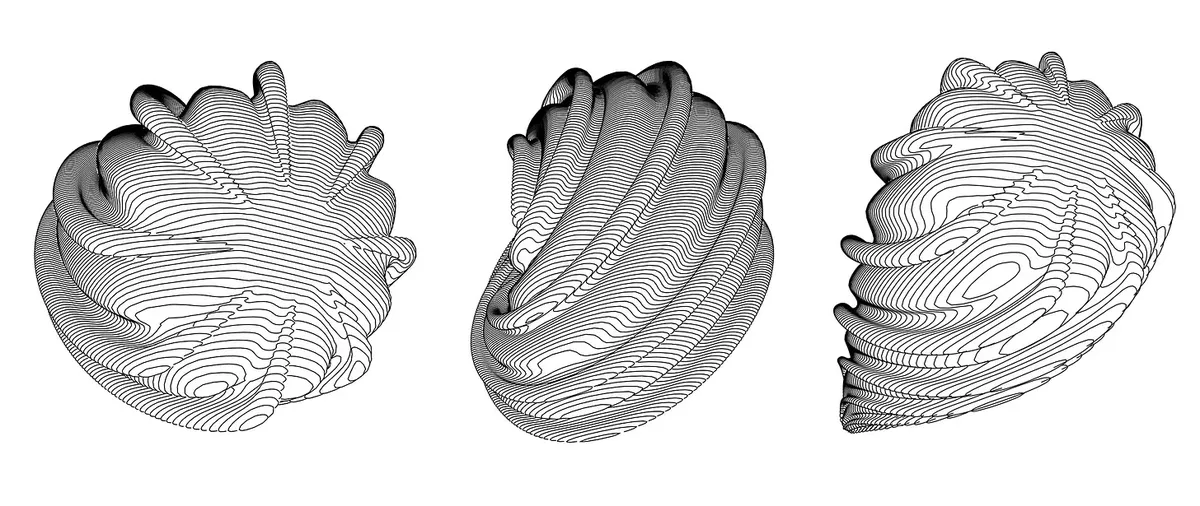
- 2D Composition for Work on Paper: These vector graphics are assembled into iterative 2D compositions.
- From Vector Graphics to Drawing Machine: The composed vector designs are then fed into the AxiDraw drawing machine, which translates digital instructions into physical works on paper.
- Watercolor Drawing: Watercolor is applied by hand to the machine-drawn works, introducing organic elements that create a dialogue between the human and the digital.
- Animating the Drawings (2D, 3D, AI): The static works on paper become the foundation for a series of animations mixing 2D, 3D, and AI-driven techniques, playing with stillness and motion.
12. Creative AI
Turtle already gives me procedures. SVG gives me precision. Python gives me computation. 3D software gives me spatial transformation. A drawing machine gives me physical execution. Watercolor gives me material behaviour and instability. So what is particular about generative AI?
Generative AI introduces probabilistic variation and what I describe here as interpretation.
It can take relationships that I have already established and reinterpret them through another visual logic. It can preserve some things and distort others. It can connect visual concepts that were not explicitly encoded together. It can produce variations I did not specify.
And it can misunderstand me.
13. Is AI non-deterministic?
In ordinary use, generative image systems often behave stochastically: repeated generations from the same or similar inputs can produce different results rather than one uniquely prescribed image. But generative AI is not simply randomness. Randomness alone is not creativity. The system operates in a learned space of visual relationships. Its variations are informed by patterns learned during training and conditioned by the prompt, references and other inputs. So the machine is not simply rolling dice over pixels. It is generating within a space of learned possibilities. I can constrain the system through a prompt. But I do not specify every pixel. There is a space between my instruction and the result. That space is where interpretation happens. With SVG, I can say exactly where the circle is. With generative AI, I can describe what I want the image to become, but the system participates in determining how that request is visually resolved.
14. Precision and uncertainty are both materials
Precision and uncertainty do not have to oppose each other in the creative process. They can both become materials. I want to know which kind of system I am using. If I expect generative AI to behave like CAD or SVG, I may become frustrated by its inaccuracies. If I understand that its strength lies elsewhere, those differences become useful. Likewise, if I expect deterministic geometry to surprise me in exactly the way a generative model does, I am asking it to perform a different operation from the one it was designed to perform. The creative possibility comes from moving between them.
15. The rounded cross as a test object
The rounded cross becomes useful because it is simple enough to recognize but precise enough to measure. I know exactly how it should be constructed. That gives me a reference against which I can observe transformation. In AI, I can observe how its visual identity survives even when its exact geometry does not. The form becomes like a test object travelling through different computational systems. And each system shows something about itself through what it does to the object.
16. References: the deterministic constructions
These are the exact constructions behind the experiment. The same geometry can be represented in different ways. In this experiment, AI wrote the SVG code, but once checked and rendered, the geometry is executed deterministically. AI generated the instructions; SVG executed the construction.
Turtle / Logo → procedure [180° outward + 90° inward] × 4
SVG → vector geometry [one arc pair] rotated × 4
NINE_CIRCLES (SVG)
<svg xmlns="http://www.w3.org/2000/svg"
     viewBox="-110 -110 620 620"
     width="620" height="620">

  <title>Nine Circles</title>

  <g fill="none" stroke="black" stroke-width="3">

    <circle cx="0"   cy="0"   r="100"/>
    <circle cx="200" cy="0"   r="100"/>
    <circle cx="400" cy="0"   r="100"/>

    <circle cx="0"   cy="200" r="100"/>
    <circle cx="200" cy="200" r="100"/>
    <circle cx="400" cy="200" r="100"/>

    <circle cx="0"   cy="400" r="100"/>
    <circle cx="200" cy="400" r="100"/>
    <circle cx="400" cy="400" r="100"/>

  </g>
</svg>
NINE_CIRCLES (Turtle / Logo)
TO RIGHTARC :R :A
  REPEAT :A [
    RIGHT .5
    FORWARD (2 * :R * SIN .5)
    RIGHT .5
  ]
END

TO CIRCLEAT :X :Y :R
  PENUP
  SETXY (:X - :R) :Y
  SETHEADING 0
  PENDOWN
  RIGHTARC :R 360
END

TO NINE_CIRCLES :R
  CIRCLEAT (-2*:R) ( 2*:R) :R
  CIRCLEAT 0       ( 2*:R) :R
  CIRCLEAT ( 2*:R) ( 2*:R) :R

  CIRCLEAT (-2*:R) 0 :R
  CIRCLEAT 0        0 :R
  CIRCLEAT ( 2*:R) 0 :R

  CIRCLEAT (-2*:R) (-2*:R) :R
  CIRCLEAT 0        (-2*:R) :R
  CIRCLEAT ( 2*:R) (-2*:R) :R
END
For R = 100, adjacent centres are separated by 200 = 2R, so the circles are exactly tangent.
Note to be precise: This Turtle implementation deterministically approximates the circle with 360 small straight segments. The SVG
ROUNDED_CROSS (SVG)
<svg xmlns="http://www.w3.org/2000/svg"
     viewBox="-110 -110 620 620"
     width="620"
     height="620">

  <title>Rounded Cross</title>

  <defs>
    <!-- ONE UNIT:
         180° outward arc
         + 90° inward arc -->
    <path id="rounded-cross-unit"
      d="
        M 100 0
        A 100 100 0 0 1 300 0
        A 100 100 0 0 0 400 100
      "
    />
  </defs>

  <g
    fill="none"
    stroke="black"
    stroke-width="3">

    <!-- REPEAT THE SAME UNIT × 4 -->

    <use href="#rounded-cross-unit"/>

    <use href="#rounded-cross-unit"
         transform="rotate(90 200 200)"/>

    <use href="#rounded-cross-unit"
         transform="rotate(180 200 200)"/>

    <use href="#rounded-cross-unit"
         transform="rotate(270 200 200)"/>

  </g>

</svg>
ROUNDED_CROSS (Turtle / Logo)
TO RIGHTARC :R :A
  REPEAT :A [
    RIGHT .5
    FORWARD (2 * :R * SIN .5)
    RIGHT .5
  ]
END

TO LEFTARC :R :A
  REPEAT :A [
    LEFT .5
    FORWARD (2 * :R * SIN .5)
    LEFT .5
  ]
END

TO ROUNDED_CROSS :R
  PENUP
  SETXY (-1*:R) (2*:R)
  SETHEADING 0
  PENDOWN

  ; THE WHOLE SHAPE:
  REPEAT 4 [
    RIGHTARC :R 180
    LEFTARC  :R 90
  ]
END
The whole contour comes from one repeated relationship:
SETUP:
position + orientation

SHAPE:
[180° outward arc + 90° inward arc] × 4
ROUNDED_CROSS_SQUARE (SVG)
<svg xmlns="http://www.w3.org/2000/svg"
     viewBox="-110 -110 620 620"
     width="620"
     height="620">

  <title>Rounded Cross with Square</title>

  <defs>
    <path id="rounded-cross-unit"
      d="
        M 100 0
        A 100 100 0 0 1 300 0
        A 100 100 0 0 0 400 100
      "
    />
  </defs>

  <g
    fill="none"
    stroke="black"
    stroke-width="3">

    <rect
      x="0"
      y="0"
      width="400"
      height="400"
    />

    <use href="#rounded-cross-unit"/>

    <use href="#rounded-cross-unit"
         transform="rotate(90 200 200)"/>

    <use href="#rounded-cross-unit"
         transform="rotate(180 200 200)"/>

    <use href="#rounded-cross-unit"
         transform="rotate(270 200 200)"/>

  </g>

</svg>
ROUNDED_CROSS_SQUARE (Turtle / Logo)
The square is independent of the cross. It has side 4R; the rounded cross is generated by [180° outward + 90° inward] × 4. For R = 100, both occupy the same 400 × 400 reference field.
TO SQUARE :R
  PENUP
  SETXY (-2*:R) (2*:R)
  SETHEADING 90
  PENDOWN

  REPEAT 4 [
    FORWARD (4*:R)
    RIGHT 90
  ]
END

TO ROUNDED_CROSS_SQUARE :R
  SQUARE :R
  ROUNDED_CROSS :R
END
For R = 100:
circle / arc radius = 100
square side         = 400